Unit Economics
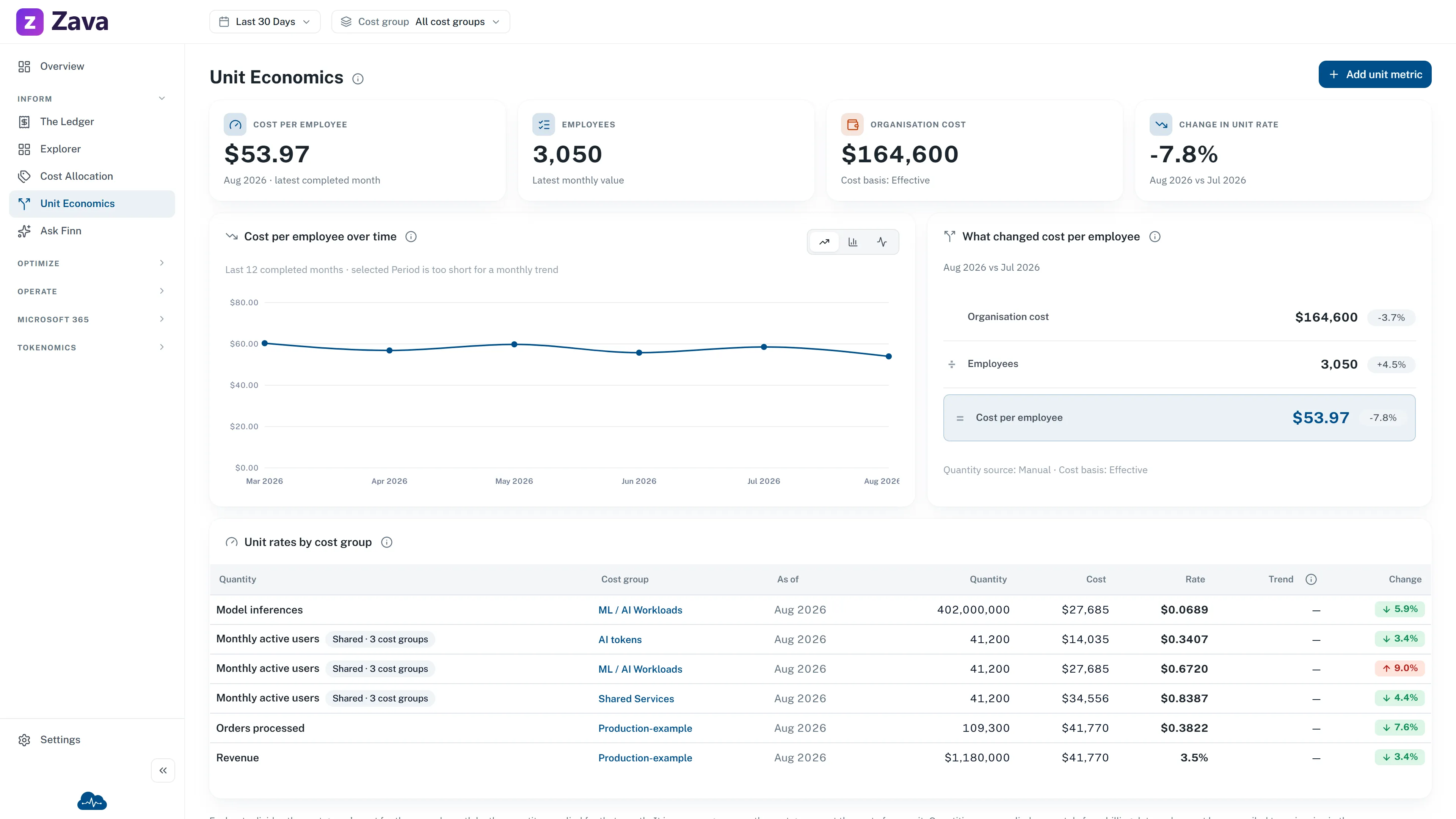
Unit Economics answers one question: is spend growing because the business is growing, or because something is wrong? A bill that rises 20% while the work it pays for rises 40% is a success story that looks like a problem, and total spend cannot tell the two apart.
The screen shows a rate for every cost group that has one: that group’s cost for a month, divided by what the group produced that month.
You supply the denominator
Section titled “You supply the denominator”CloudMonitor knows what you spent. It has no way to know how many orders you shipped, how many patients you saw, or how many customers you have, so you tell it, one number per month, per cost group.
There is no fixed list to choose from. The quantity is whatever your business actually counts, and
the labels are built from the word you give it: enter order and the screen reads Cost per order;
enter customer and it reads Cost per customer.
That is also the limit of it. A quantity has to be an amount that grows as you do more work. Report staleness in hours, a 99.2% success rate and an uptime figure are all real measures, but dividing cost by one produces a confident number that means nothing. Track those beside cost, not underneath it.
Where the numbers are entered
Section titled “Where the numbers are entered”On the cost group, not here. Open Cost Allocation ▸ Cost Groups, choose a group, and use its Unit economics tab. This screen is the read-only roll-up of every cost group that has a quantity.
Entering values is the cost group Owner’s job, so if the tab shows rates but offers no way to change them, you are reading someone else’s cost group.
Sharing one quantity across cost groups
Section titled “Sharing one quantity across cost groups”Monthly active users is one number for the whole business, but several teams are measured against it. Rather than typing it into each cost group and watching the copies drift, attach the same quantity to each one: you enter the number once, and every cost group divides its own cost into it.
Each group gets its own rate from the same denominator, which is the point: that is how you see which team costs the most per user.
The trade is that the number belongs to all of them. Changing a shared quantity’s values needs ownership of every cost group it feeds, so one team cannot quietly move a figure another team is measured on.
What the rate means, and what it does not
Section titled “What the rate means, and what it does not”A rate here is an average across the whole cost group for one month. Cost per order of $2.40 does not mean the next order costs $2.40: most cloud cost does not move with one more unit of anything. It means that month’s spend, spread over that month’s orders.
That distinction matters when someone asks you to price a customer or a feature from it. The rate is a trend line for a team’s efficiency, not a unit price.
Rules that keep a rate honest
Section titled “Rules that keep a rate honest”CloudMonitor will show a gap rather than a number it cannot stand behind:
- The current month never gets a rate. A whole month of orders divided by a part-month of cost reads far too cheap. The month in progress shows its cost and its quantity, marked In progress, and no rate.
- A month with no value stays empty. It reads No value, and no neighboring month’s figure is borrowed to fill it.
- The headline names its own month. It answers for the latest completed month that has a value, not necessarily last month, if last month was never filled in.
- Some quantities are never added up across months. The same active user in January and February is one person, not two, so a figure spanning several months is the average of the monthly rates rather than one total divided by another. CloudMonitor works out which kind you have from what you called it, tells you in the form, and lets you correct it.
Money quantities
Section titled “Money quantities”A quantity can be a money amount instead of a count: revenue is the usual one. You get a percentage rather than a rate: cloud cost as a share of revenue, and the margin left after it.
That margin is after cloud cost only. It is not gross margin, and the screen says so, because nothing else in your cost of sale is in CloudMonitor.
Money quantities use your workspace reporting currency. There is no conversion, so a figure recorded in another currency is set aside rather than silently mixed in.
Filters
Section titled “Filters”Period and cost basis apply normally. The provider and virtual tag filters do not: a rate divides one cost group’s cost by that cost group’s quantity, and narrowing only the cost half would quietly produce a wrong number. CloudMonitor grays those filters out with the reason rather than letting that happen.
If you never use it
Section titled “If you never use it”Nothing degrades. A cost group with no quantity is complete, not unconfigured: it raises no warning, appears in no checklist, and costs nothing to leave alone. Unit economics is something a cost group owner opts into, one group at a time.
Related
Section titled “Related”- Inside a cost group: the tab lives here
- How to measure cost per unit: the recipe
- Cost Groups: how spend gets attributed in the first place, which is what a rate divides