Unallocated Costs
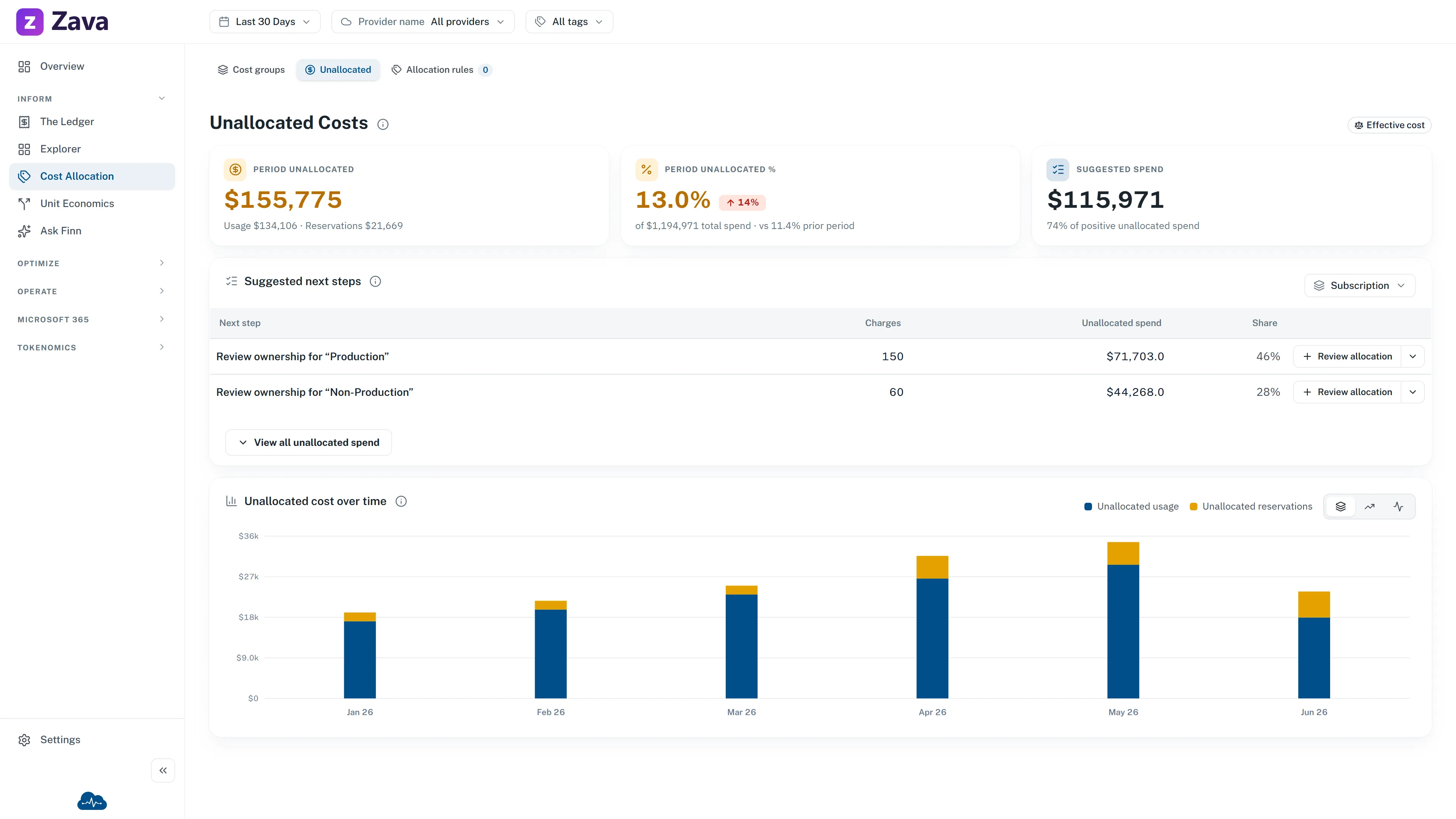
Unallocated cost is spend outside every current cost group after the latest processing run. That can mean no allocation rule matched, or that the upstream ownership data did not place the charge in a group. In practice, it belongs to nobody. This report tells you how much of that you have and whether the number is moving in the right direction.
It’s the health check on everything else. Chargeback, budgets and team-level reporting are all only as good as the fraction of spend that’s actually attributed.
The numbers
Section titled “The numbers”Period unallocated: spend in the period that matched no cost group, split into Unallocated usage and Unallocated reservations.
Period unallocated %: the one to watch. It’s a ratio, so it’s directly comparable with the previous period regardless of whether the bill grew, and it doesn’t shift when you change cost basis. The whole bill it’s measured against sits underneath it.
Suggested spend: the spend covered by the next one or two ownership reviews, as a share of positive unallocated spend. It shows where current-period spend is concentrated. It does not prove that an allocation rule is needed.
The queue shows only the largest positive group when that group is at least 85% of the positive unallocated total for the split. Otherwise it shows the two largest positive groups. Any positive remainder stays in the denominator, so the displayed shares are not overstated. There is no separate materiality or recurrence test: a small group can still be suggested because suggested means inspect next, not automate.
Unallocated cost over time charts the trend, split by usage and commitment purchases.
Suggested next steps
Section titled “Suggested next steps”This is a short review queue, not a list of rules CloudMonitor thinks you should create. It starts with the largest current ownership gaps for the dimension you choose: subscription, resource group, service, region and so on, and shows at most two prompts.
A prompt such as Review ownership for “Platform-Prod” asks for a business decision. Before saving an allocation rule, confirm that the matching spend should always route to one cost group, that the pattern is expected to recur, and that changing tags at source would not be the better fix. For a blank value, Investigate charges with no dimension makes the missing ownership signal explicit.
Review allocation opens the allocation review with that group prefilled. It is a shortcut into the review, not approval to save the rule. If allocation changes are still waiting for the reporting refresh, the queue shows Waiting for processing instead of proposing more work from stale data.
View all unallocated spend opens the technical breakdown for the selected dimension. Every row there is an exact possible allocation condition, not a recommendation to create a rule. The rows do not overlap and their shares add up across the split.
Charges counts the charge records behind the row, not resources: a single resource billed daily for a month is thirty charges.
Everything else in All unallocated spend is the exact remainder: your unallocated total minus the rows listed. It appears only when there is one, and it is not actionable, because no single condition describes “the rest”. If the list was too long to show in full, the rows held back are counted here too, so the column always adds up to the total above it.
Switching the dimension re-splits the same money a different way and recalculates the next review prompts. Use the split that best represents real ownership; concentration alone is not evidence that a rule is correct.
Usage and reservations are different problems
Section titled “Usage and reservations are different problems”Worth separating before you go fixing anything.
Unallocated usage is normally a tagging gap. Resources are running without whatever your rules match on. The fix is upstream, in how resources get created.
Unallocated reservations is normally an allocation-rule gap. A commitment purchase is a real charge that has to land somewhere, and it often doesn’t carry the tags an ordinary resource does. Rules can route these by name. See the cost group code in the glossary.
Why the cost group filter is grayed out
Section titled “Why the cost group filter is grayed out”Because it would be a contradiction. Unallocated cost is, by definition, spend outside every cost group, so scoping it to one group would return nothing. CloudMonitor grays the chip and says so rather than showing you an empty report.
Every other filter applies normally.
What to do about it
Section titled “What to do about it”There’s no single right number, but the trend matters more than the level. A percentage that’s climbing means new spend is arriving unattributed faster than you’re closing the gap.
The levers:
- Allocation rules route existing spend to a group without touching any resource. Fastest fix, and the right one for commitment purchases and shared services.
- Tagging fixes it at source, so new resources arrive attributed. Slower, but it’s the one that stops the problem recurring.
Both are admin work. See the how-to articles.
Who can see this
Section titled “Who can see this”This report follows membership of the built-in Unallocated group, like any other cost group. The invite dialog ticks Unallocated by default, so in practice most people have it, which is deliberate: unattributed spend is everyone’s problem, and hiding it from most of the organization is how it grows.
It isn’t automatic, though. An admin who unticks Unallocated when inviting someone, or removes them from it later, keeps that person out of this report until they’re added back. Nothing re-grants it on sign-in. Admins see every group regardless.