Commitments
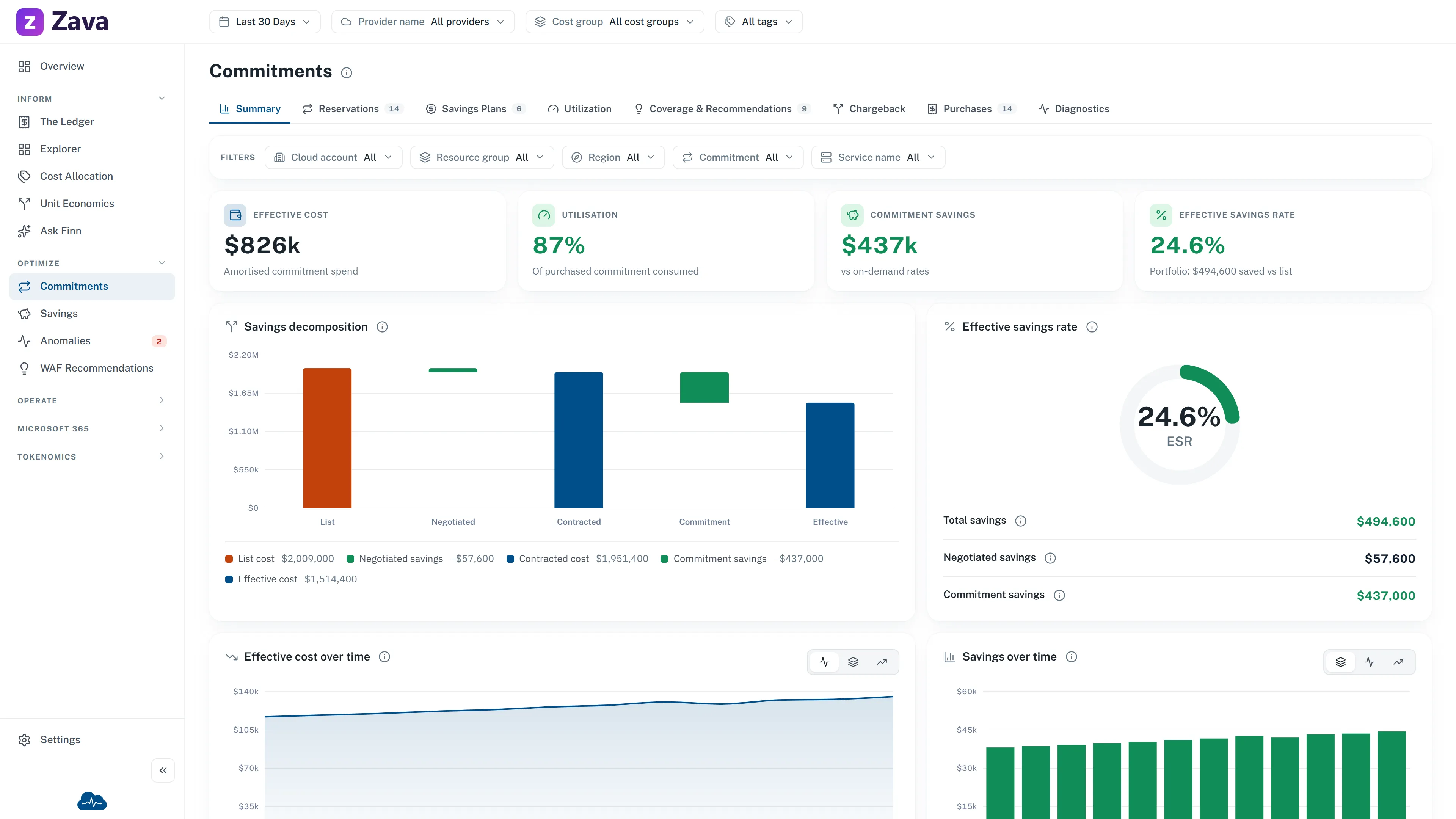
A commitment is a promise to use a certain amount over a term in exchange for a lower rate. Get them right and they’re the largest single lever on a cloud bill. Get them wrong and you’ve prepaid for things you don’t use.
This report covers both kinds: a Reservation commits to a specific resource type, a Savings Plan commits to a level of spend per hour and is more flexible for a slightly smaller discount.
The numbers that matter
Section titled “The numbers that matter”Utilization: reservation hours used as a share of hours purchased. When hour-level detail is not available, the screen uses amortized cost as the proxy. Unused commitment is money already spent for nothing, so this is the number that catches waste.
Commitment savings: list price, or the on-demand equivalent, minus what you actually paid. What the commitments earned you vs on-demand rates.
Effective savings rate: those savings as a share of list cost, across the whole portfolio. The single number for “are commitments working for us?”
Coverage is the counterpart: how much of your eligible usage a commitment covers. Low coverage means you’re paying on-demand for things a commitment could have discounted: the opposite failure to low utilization, and just as expensive.
The tabs
Section titled “The tabs”The screen has tabs for Summary, Reservations, Savings Plans, Utilization, Coverage & Recommendations, Chargeback, Purchases and Diagnostics.
The seven detail tabs provide saved views; Summary does not. The open tab is remembered for the current browser session, separately for the Commitments, Reservations and Savings Plans menu entries. It is not added to a copied link.
Ways to count a purchase
Section titled “Ways to count a purchase”The cost basis changes the headline cost tile:
- Billed cost totals positive purchase transactions in the selected period: the cash view.
- Effective cost shows the amortized cost of the commitments currently in view, spread across the term they cover.
The Purchases tab always shows invoiced transactions, while the savings waterfall keeps its own list, contracted and effective definitions. For “what did we pay this month”, use billed. For “what is this team’s spend”, use effective. See effective cost vs billed cost.
Filters
Section titled “Filters”Every global filter applies. Note that virtual tags narrow the resource-level chargeback (which resources consumed each reservation) rather than the portfolio itself. Commitments don’t carry resource tags of their own; the things consuming them do.
Before you buy anything
Section titled “Before you buy anything”Habits worth having:
- Check expiration before renewing. A commitment that expires mid-period quietly moves that spend back to on-demand rates, and the bill goes up without anyone changing anything.
- Check utilization on what you already own before buying more. Adding coverage on top of an under-used commitment compounds the mistake.