AI Spend reports
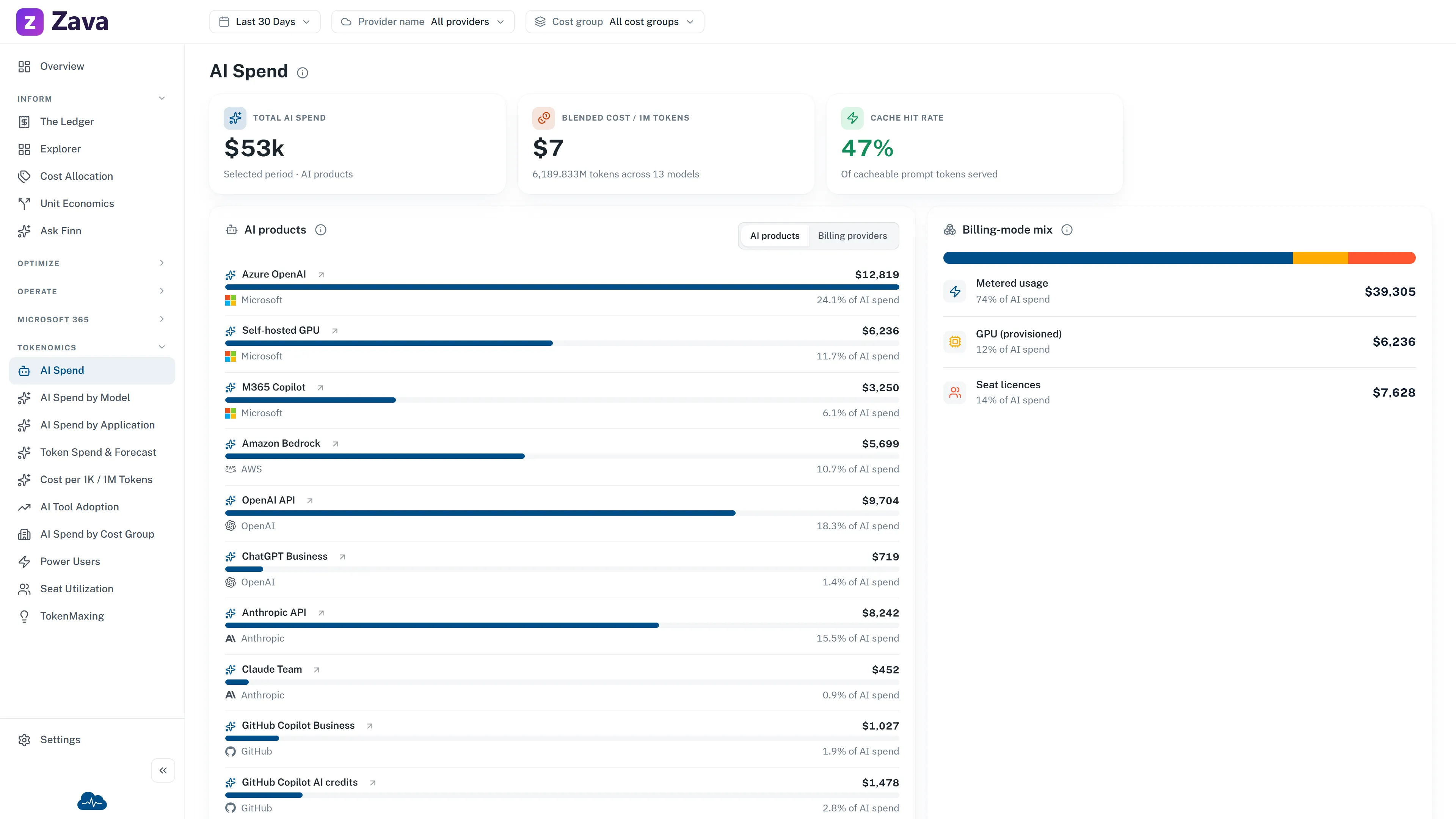
AI spend behaves unlike anything else on your bill. It’s consumption-based with no capacity to rightsize, the unit price changes when someone switches model, and a single badly-written prompt loop can cost more than a server. It gets its own reports for that reason.
What each view answers
Section titled “What each view answers”| View | Answers |
|---|---|
| AI Spend | What AI products cost, and which billing provider charged them |
| AI Spend by Model | Which models, with the input/output mix and blended unit cost |
| AI Spend by Application | Which application, team and cost group the spend belongs to |
| Token Spend & Forecast | Where the month lands, against budget |
| Cost per 1K / 1M Tokens | The unit rate over time, and the cache-hit rate driving it |
The number to watch
Section titled “The number to watch”Cost per 1K / 1M tokens is the AI equivalent of unit economics. Total AI spend going up while cost per million tokens goes down means you’re getting more work done more efficiently: a good month that looks like a bad one on the total alone.
Cache-hit rate is the biggest lever on that rate, which is why it sits on the same view.
AI products and billing providers
Section titled “AI products and billing providers”AI Spend starts with products, not a renamed provider. For example, M365 Copilot is an AI product and Microsoft remains its billing provider. Switch to Billing providers to see M365 Copilot roll up with other Microsoft-billed AI products such as Azure OpenAI, without rewriting the source provider.
M365 Copilot is included only when your cost data records a Microsoft charge with service Microsoft 365 and a charge description that identifies M365 Copilot. This is license cost only: it does not infer token use, assigned seats, or which people used the licenses.
Select the M365 Copilot product row to open M365 Copilot License Economics. That detail screen shows the latest license snapshot beside selected-period net cost, refunds, monthly trend, and mapped charge lines. On that screen, Period and Cost basis apply to cost; Provider, Cost Group, and Tags do not apply.
Seat license cost for Claude Enterprise and ChatGPT Enterprise
Section titled “Seat license cost for Claude Enterprise and ChatGPT Enterprise”Claude Enterprise and ChatGPT Enterprise report how many seats you hold. Neither reports what a seat costs, so CloudMonitor estimates seat cost from the seat count and a price you enter.
Set the monthly price per seat in Settings, on the Cost ingestion tab, in your reporting currency. ChatGPT Enterprise has a price for each seat type. Claude Enterprise has one price, so enter your average across seat types. A price of 0 leaves that product’s seats uncosted, which is how every workspace starts.
Each day’s seat cost is the seats you held that day, multiplied by the monthly price and divided by the days in that month. It appears as its own row, Claude Enterprise seats or ChatGPT Enterprise seats, next to the usage row for the same product. The amount follows the price you enter, so it can differ from what the vendor invoices.
Seat cost counts toward cost groups, anomaly detection and the provider totals. A budget on Anthropic or OpenAI includes it as soon as you set a price. When you change a price, the current and previous month are recalculated and earlier months keep the price they were written with. A day appears once that day’s seat count has been reported, so the latest day can lag.
The same tab holds M365 Copilot seat, monthly price. Enter the monthly price per Microsoft 365 Copilot seat in the currency your tenant is billed in. It sets the saving on each recommendation to reclaim an unused M365 Copilot seat, and it estimates M365 Copilot seat cost. A price of 0 means not set: recommendations show their saving as unavailable and no seat cost is written.
M365 Copilot seat cost
Section titled “M365 Copilot seat cost”CloudMonitor records how many M365 Copilot seats your tenant has bought each day. Once you set the monthly price, each day’s cost is the seats bought that day, multiplied by the monthly price and divided by the days in that month. Seats you have bought but not assigned to anyone are counted, because Microsoft bills for them. The cost appears as Microsoft 365 Copilot seats under the provider Microsoft 365.
If your Microsoft 365 is billed on the same invoice as Azure, Microsoft’s cost data already carries your M365 Copilot charges. CloudMonitor shows those under the provider Microsoft 365 too, and writes no estimate for a month that has one, so the cost is never counted twice. A month with no such charge gets the estimate.
Because all M365 Copilot cost is under Microsoft 365 and Azure spend is Microsoft, you can create an organization budget that tracks M365 Copilot on its own: in the budget’s Providers field, select Microsoft 365. A budget on Microsoft does not include M365 Copilot.
Seat counts are recorded from the day this feature reached your workspace, so earlier days have no estimate. When you change the price, the current and previous month are recalculated and earlier months keep the price they were written with.
Plans with no usage feed
Section titled “Plans with no usage feed”A plan such as Claude Team reports neither usage nor seats to CloudMonitor. An admin records what the plan costs in Settings ▸ Subscriptions: the provider, the service name, the number of seats, the monthly price per seat and the dates it applies. Each day then costs the seats times the monthly price, divided by the days in that month, and appears as its own row under the service name entered. See how to record a subscription.
What’s live and what isn’t
Section titled “What’s live and what isn’t”So: treat the cost figures as real and the fine-grained token metrics as directional unless the screen tells you otherwise.
Filters
Section titled “Filters”Period, provider, cost group and cost basis all apply. The provider chip filters the raw billing provider, so selecting Microsoft includes both Azure OpenAI and M365 Copilot where they are present.
Virtual tags don’t: token telemetry carries no resource tags, and the chip says so.
Where the other AI screens are
Section titled “Where the other AI screens are”This report is about cost. The adoption question (who’s using which tool, and are the seats worth it) is on AI tool adoption, and the optimization suggestions are on TokenMaxing.