Azure FinOps on Microsoft Fabric
Turn Azure billing data into reports, cost controls, and evidence-backed decisions.
CloudMonitor turns your FOCUS export into one cost model. CloudMonitor runs on Microsoft Fabric: in your own Fabric tenant by default, or CloudMonitor-hosted. Approved users explore reports and manage cost rules. Ask Finn is limited to active, licensed organization administrators and verified support staff in Support mode. Your team approves every workload change.
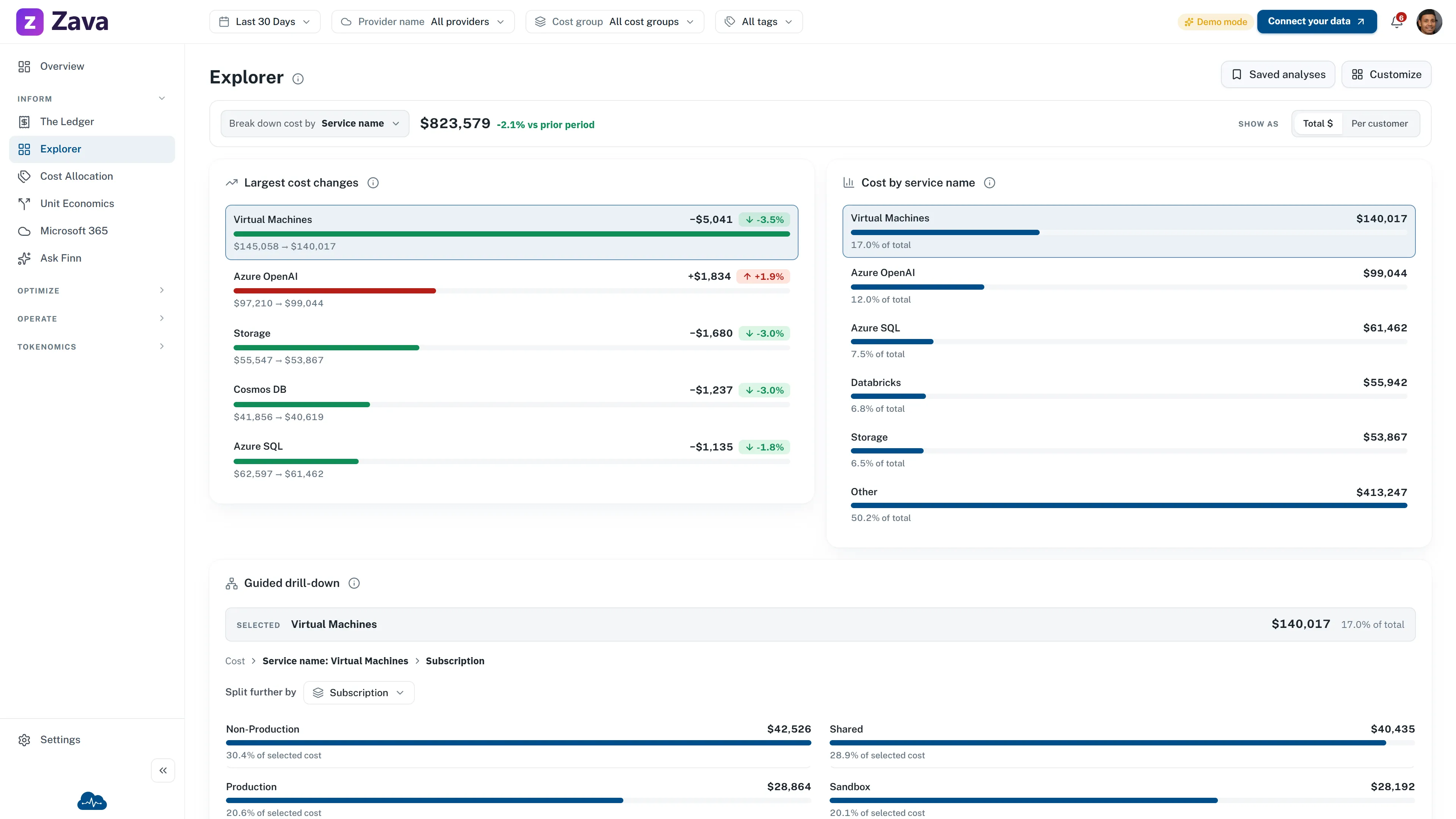
Working product
The governed cost model connects reports, controls, and investigations.
The product surfaces share data and permissions, but each one serves a different job.
- FinOps Reports
- Explore Azure cost by subscription, service, cost group, or tag, then continue to the Ledger for source rows.
- Admin App
- Define allocation rules, cost groups, owners, budgets, and audience access while unallocated spend remains visible.
- Ask Finn
- Active, licensed organization administrators and verified support staff using Support mode can investigate cost changes, anomalies, budgets, forecasts, and savings against organization-wide CloudMonitor cost data.
Installation responsibilities
Access, setup, and action each have a clear owner.
Your Azure admin approves scoped access. CloudMonitor connects the export and checks the first refresh. Finance and engineering choose what to act on.
Elapsed time depends on your Azure approval process and CloudMonitor's connection checks.
- You approveYour team Azure administrator
Approve access
Approve the CloudMonitor app in Azure. Grant the required roles, then make the FOCUS export available.
- Application approval
- Billing scope + FOCUS export
- We configureCloudMonitor Onboarding team
Connect and validate
We set up your dedicated workspace, connect the export, and check the first data refresh.
- Connection check
- First data refresh
- People decideYour team Finance + engineering
Review the findings
Your teams use reports and cost controls. Active, licensed organization admins can use Ask Finn. Verified support staff can use Support mode. People choose which changes move forward.
- Reports + allocation
- Role-gated Ask Finn
- Human-approved action
Billing data flow
Your export stays in customer-owned storage, and you choose where the reporting runs.
Azure Cost Management writes the raw FOCUS export to a storage account you own. Billing and resource metadata access is read-only. One management role is limited to the export storage account. CloudMonitor uses it only to create and run the scheduled export. It does not provide write access to your workloads.
By default we deploy CloudMonitor into a Fabric workspace on capacity you own, in your own Microsoft Fabric tenant. CloudMonitor-hosted stays available if you would rather we ran that capacity. Architecture and data flow sets out where each layer runs in both arrangements.
Swipe the diagram to follow the full data flow.
Inform · Optimize · Operate
Each investigation returns evidence to the next FinOps decision.
Reports help teams explain a signal, compare options, and carry an approved decision into normal operations. Eligible administrators can use Ask Finn to assemble an investigation. The cycle repeats as cost and context change.
-
Inform
Explain the signal
Set the period, cost basis, and scope. Reports establish the evidence. Eligible administrators can use Ask Finn to explain a variance or anomaly.
-
Optimize
Compare the options
Compare savings, usage, rates, licenses, and design options. Review the evidence and limits before you choose a path.
-
Operate
Keep the decision accountable
Your team assigns the work, follows its approval process, and checks the result. CloudMonitor does not change the workload.
As spend changes, the team returns to Inform with new evidence.
See how Ask Finn supports the cycle →Operating model
CloudMonitor supports the practice while your teams keep ownership.
Finance, engineering, and business teams work from the same cost model. CloudMonitor keeps setup and findings clear. Your teams set priorities, run the FinOps process, and approve each change.
FinOps Framework alignment
Use the same evidence across the current Domains.
Before onboarding
Questions security and Azure teams ask before they approve access.
What exactly am I approving?
Approve the CloudMonitor app in your Microsoft Entra tenant so Azure creates its service principal. Then grant the required scoped roles. These include read access for billing and resource metadata. One management role is limited to the dedicated export storage account, where CloudMonitor creates and runs the scheduled export. In your own Fabric tenant you also provide the Fabric capacity and the workspace we deploy into, and you grant us a role on that workspace; under CloudMonitor-hosted, that capacity and workspace are ours. CloudMonitor holds a scoped workspace role in both arrangements so we can deploy, update and support the app. In your own Fabric tenant that role covers only the workspace you granted it on. It carries no visibility of any other workspace in your tenant and no rights over your Entra directory. CloudMonitor cannot read the data inside your workloads or services.
How does our Azure billing data reach CloudMonitor?
Set up a FOCUS cost export to an Azure Storage account in your tenant, then grant CloudMonitor the required scoped roles. Raw source files stay in that account. Billing and resource metadata access is read-only. One management role is limited to the export account so CloudMonitor can create and run the scheduled export. CloudMonitor reads it through a OneLake shortcut and does the ingest, cleansing and modeling in our own Fabric tenancy, in the Azure and Microsoft Fabric region you choose during onboarding. That much is the same in both arrangements. Where the finished data comes to rest is what your choice settles: in your own Fabric tenant we write the modeled cost tables into a lakehouse in your workspace, on your capacity, and deploy the semantic model and the CloudMonitor app there on top of them. Under CloudMonitor-hosted, those stay in the workspace we run for you inside our tenancy. CloudMonitor cannot read content inside your resources. See the Information Trust Center for the full data-flow detail. Architecture and data flow sets out where each layer runs in both arrangements.
Why does CloudMonitor need a write role on the storage account if cost access is read-only?
CloudMonitor's access to your cost and usage data is read-only. The one management role is limited to the storage account that receives your cost exports. CloudMonitor uses it only to create and run the scheduled Azure Cost Management export. Azure requires write access on the destination account to set up the export. That role cannot access your other resources or workload data. CloudMonitor reads the exported files with a separate read-only role. See the access guide.
Can CloudMonitor see our application data?
No. CloudMonitor processes billing and resource metadata, its own setup data, and account profile fields used for sign-in. If you connect Fabric or AI features, it also processes Fabric capacity or AI token usage metrics. It cannot read secrets or content inside your VMs, databases, storage objects, or other workloads.
Where is our data stored?
Azure Cost Management writes your raw FOCUS export to a storage account you own, and it stays there. CloudMonitor's ingest, cleansing and modeling run in the Azure and Microsoft Fabric region you choose during onboarding, in a dedicated environment we deploy for you there rather than in a single home region of ours. That holds in both arrangements, so choosing CloudMonitor-hosted does not move your cost processing to another region. Our shared management plane is separate and runs in Australia East.
The CloudMonitor app is a Microsoft Fabric App item, and Fabric Apps are still in preview and not offered in every region. Microsoft lists the current set in its Fabric region availability table. We confirm which regions are available with you at onboarding.
Where the finished data comes to rest is what your choice settles: in your own Fabric tenant we write the modeled cost tables into a lakehouse in your workspace, on your capacity, and deploy the semantic model and the CloudMonitor app there on top of them. Under CloudMonitor-hosted, those stay in the workspace we run for you inside our tenancy.
Your own capacity's region is yours to set and does not have to match the region your cost processing runs in. We recommend matching them, so the modeled cost tables are not written across regions.
See the current service-provider register for management-plane and supporting-service locations. Architecture and data flow sets out where each layer runs in both arrangements.
See CloudMonitor against sample Azure cost data.
Explore interactive reports and a recorded Ask Finn investigation on sample data, then compare service levels and onboarding paths.